
FIELD NOTES / PRODUCT DESIGN
Impossible Lockout in IdP Configuration
Roles & responsibilities
User Experience Design, Interaction Design, UX Strategy
Context
Setting up an Identity Provider connection is one of the first things a new Drata customer has to do. It’s how you bring your team into the product. It’s foundational. And it was responsible for a disproportionate share of early-onboarding escalations to Solutions Engineers.
The problem wasn’t that IdP setup was difficult in the abstract. It was that the product had no awareness of the conditions that would cause it to go badly—and several of those conditions could lock an admin out of their own account.

Discovery
The first step was understanding exactly how these failures happened, which meant working through SE tickets and interviews to map where things kept breaking down.
Four failure categories surfaced, each with its own resolution path, and several capable of compounding each other.
Getting the right people in the room
The IdP connection requires credentials that not every admin has access to. The person attending the customer success kickoff often wasn’t the person with IdP credentials—meaning either the right person had to be pulled into the call, or the CSM had to use Drata admin access to add them manually. The setup hadn’t even started, and it was already requiring human intervention. The product fix was a user-facing add-guest-admin function: an admin without IdP credentials could invite someone who had them, without needing CSM involvement. That resolved the access problem—but as described below, it also expanded the scope of everything else.
Four Failures…
Multiple domains in the IdP
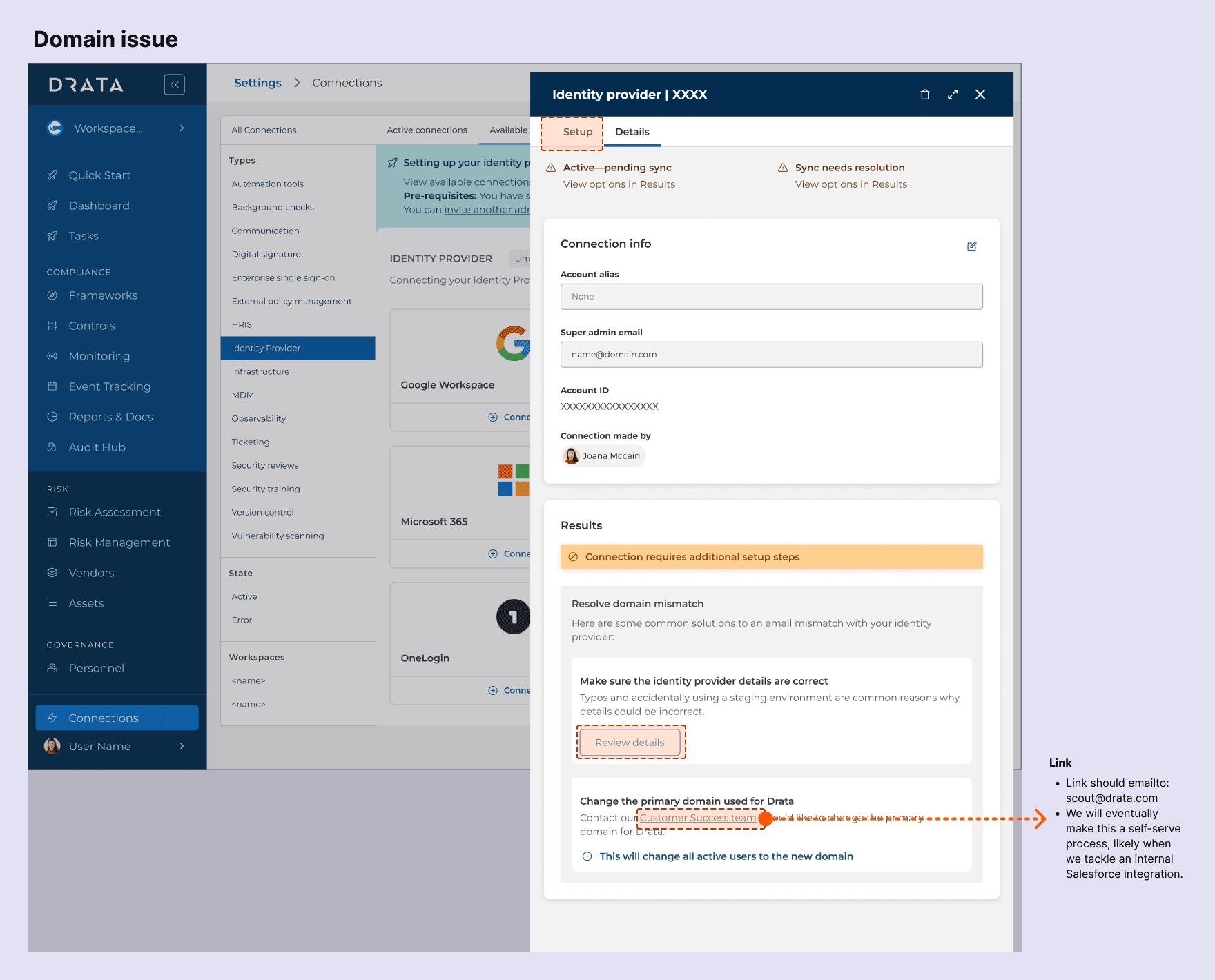
Many organizations manage several domains in their IdP (drata.com, drata.org, drata.net, and so on). The product had no way to point the integration at a specific one. Customers either got everything or nothing—which created its own downstream problems.
The username lockout
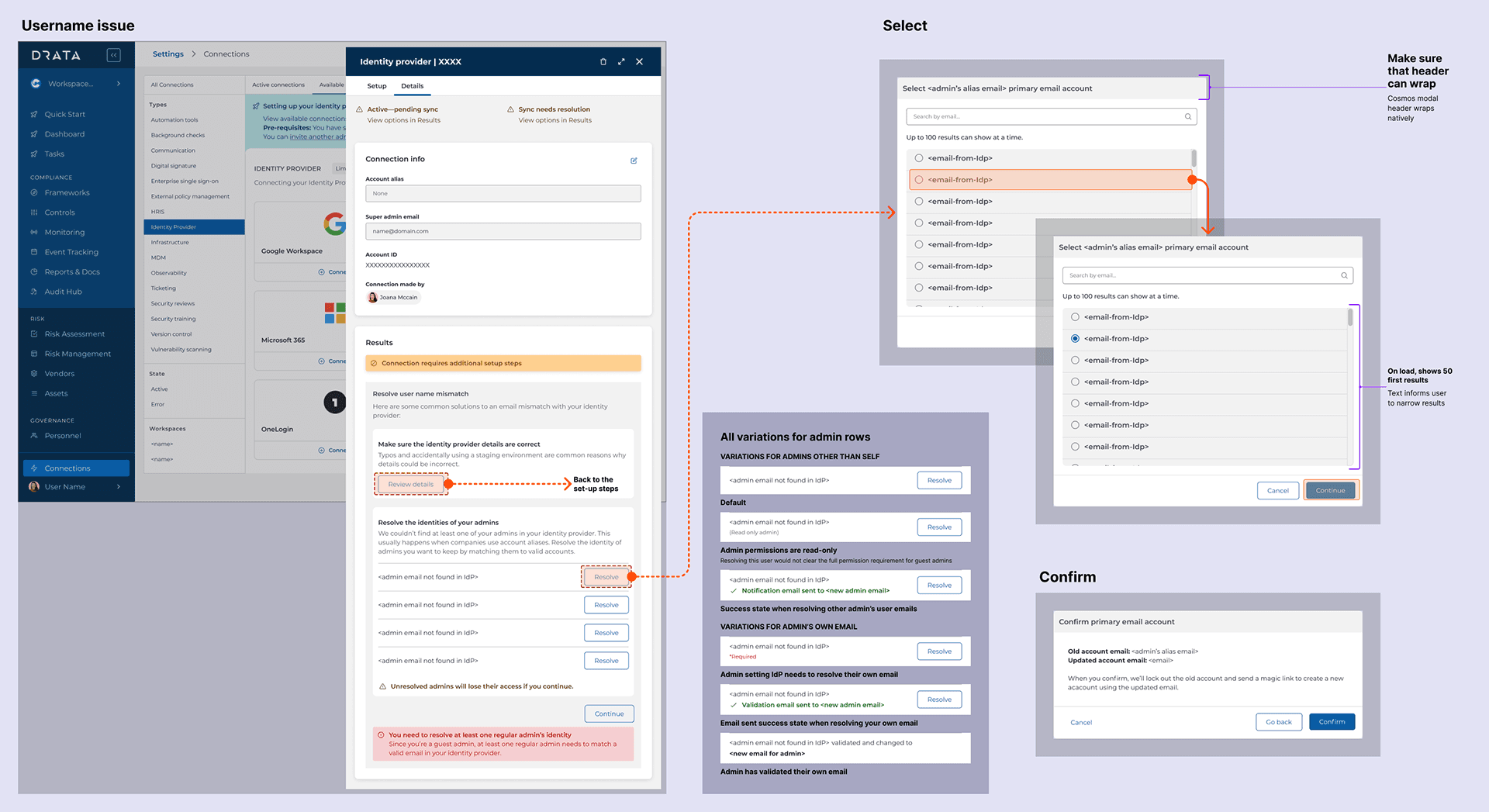
The first Drata admin is added as a guest admin, before IdP is involved. If that admin’s email username didn’t exist anywhere in the IdP, they could successfully complete the connection—and then find themselves locked out of the account they just set up.
The domain lockout
A parallel failure: if the domain of the admin’s email didn’t exist in the IdP, the same lockout could occur via a different path.
The most consequential discovery was how these failures compounded. Fixing the multi-domain problem introduced a new version of the domain lockout: if a customer chose to sync only one specific domain but their own admin email lived in a different domain, the resolution to one problem became the cause of another.
This wasn’t a UX problem that better error messages would fix. The failures were structural—the product was completing connections that it had enough information to know would cause lockouts, and it wasn’t doing anything with that information.
Re-framing the Problem
The initial instinct is to improve the error experience—clearer messages, better recovery flows, more helpful text after something goes wrong. That’s the wrong frame here.
The product wasn’t missing good error recovery. It was missing awareness. Every one of these lockout scenarios was predictable given information that was available at connection time. The admin’s email domain was known. The domains in the IdP were retrievable. Whether the admin’s username existed in the IdP was checkable. The product simply wasn’t checking.
The right frame wasn’t “how do we help users recover from lockouts.” It was: how do we use what the system already knows to make lockouts structurally impossible.
That reframe also clarified where the design work needed to happen: not in error states, but in the connection flow itself—before anything was committed.
Design Strategy
Six self-serve principles shaped the flow:
• Always demonstrate listening—show the user what the system understands about their state.
• Let people know how their information will be used before asking for it.
• Define critical concepts up front, before they become relevant.
• Pull information from earlier in the flow (like the admin’s email, captured at account creation) and ask for confirmation rather than re-collecting it.
• Avoid siloing setup content from the evergreen product experience—what users learn during onboarding should transfer.
• Use progressive disclosure to teach core actions before surfacing advanced ones.
What made these principles actionable was a read-only pre-check: before completing the IdP sync, the product establishes a read-only connection to the IdP and pulls a list of domains, groups, and users. It then runs that data against the tenant’s admins to verify that at least one full-permission, non-guest admin will survive the sync.
That check meant the design had to guide users through a decision tree clearly:
Domains…
One domain retrieved, admin email matches → proceed. No friction needed.
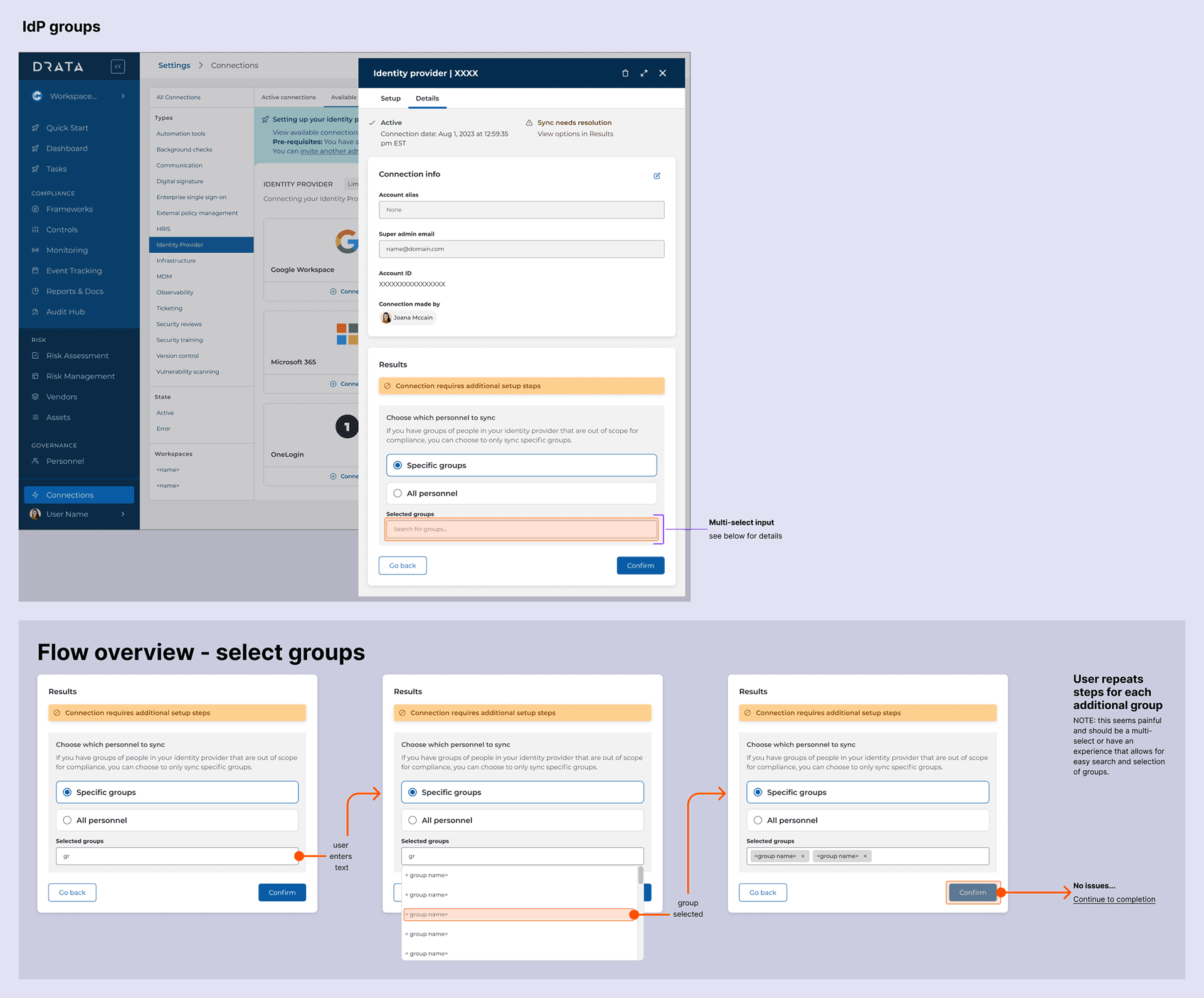
Multiple domains retrieved → surface the list and let the customer choose
Sync all domains, or specify a single one. The default is scoped to the domain matching their email, which is the safest starting point—but the choice is theirs. Granular subset selection (e.g., 2 of 3 domains) was scoped as a future enhancement; the v1 decision was to ship the binary cleanly rather than delay for full flexibility.
Users
Admin username doesn’t exist in the IdP → interrupt with a warning
A common pattern here: an org uses firstname.lastname@ as the canonical email format but permits firstname@ as an alias. The alias works for login, but it doesn’t come through with the IdP sync—so an admin who signed up with the alias would fall through the check. The fix was to let that user remap their Drata login to the full canonical email before completing the connection, rather than discovering post-sync that their account no longer worked.
Admin email domain doesn’t exist in the IdP → ask the user to update the domain associated with their Drata account
An admin might have multiple emails within their org, and the one they used to set up Drata isn’t necessarily the one the IdP recognizes. The fix was to let them specify which email should be authoritative for domain matching—not create a new identity, just align what Drata had on file with what the IdP would find. For some IdPs, this step needs to happen before the connection is even established.
Covering all cases…
The flow had to handle each branch clearly and handle the cases where branches intersect. A user who chose to sync only one domain could still hit the username problem if their email lived in a different domain—so the design checked for both conditions in sequence rather than treating them as independent.
The add-guest-admin feature added a third dimension. Once guest admins became a user-managed concept in the product, the confirmation gates had to account for them explicitly. The floor was firm: no sync completes if it would leave zero full-permission admins. But the gates also offered an optional path further: if the check surfaced guest admins whose emails didn’t exist in the IdP, the configuring admin could remap those accounts to valid IdP emails before completing the connection, rather than leaving them broken post-sync.
The confirmation layer ended up mandatory in one direction and optionally comprehensive in another. Solving the access problem didn’t just add scope—it exposed a category of problems users had no visibility into before, and gave them a way to fix those problems at exactly the right moment.
Solution
A read-only IdP pre-check that runs silently before sync, followed by targeted interruptions only when the system detects a condition that would cause a lockout. Users who hit no issues see no additional friction. Users on a collision course with their own account get a clear warning, an explanation of what the system found, and an actionable path through it.
The flow also surfaced something previously invisible: the domains currently in the IdP. Showing that list—even just to confirm it—gave admins a clearer mental model of what the connection would actually do, and who it would affect.
v1 shipped inside the existing side drawer with the legacy Drata UI…

Results
Before: customers who hit any of these failure modes had to be rescued—by a CSM, an SE, or Drata admin access. The setup process that was supposed to be self-serve was regularly becoming a support event.
After: a 10% decrease in support tickets across the product following launch. SEs were no longer the last line of defense against a problem the product could have caught itself. Customers were completing IdP setup as a product experience, not a supported onboarding event.
v2 From One Connection to All of Them…
The IdP work shipped and held up. So when Drata replatformed its core product, I got to revisit not only the IdP connection but every connection in the product, and give them all the surface that Google IdP had needed from the start.
The old setup lived in a side drawer. That works when a connection means pasting a key and walking away. It doesn’t work when setup needs resolution steps, scoping decisions, or a place to come back to after the connection is live. The IdP flow had already outgrown the drawer. The rest of the catalog was about to.
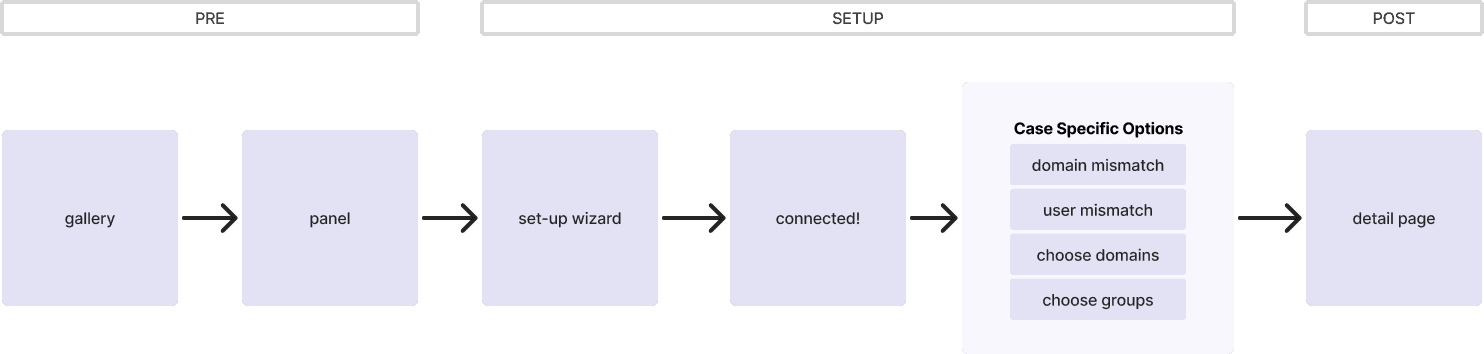
The new structure splits every connection into three phases: pre, setup, and post. Resolution and scoping steps sit inside setup and appear only when a connection needs them. A simple connection moves straight through. A connection like Google IdP gets the full decision tree.
Pre: Decide Before You Commit
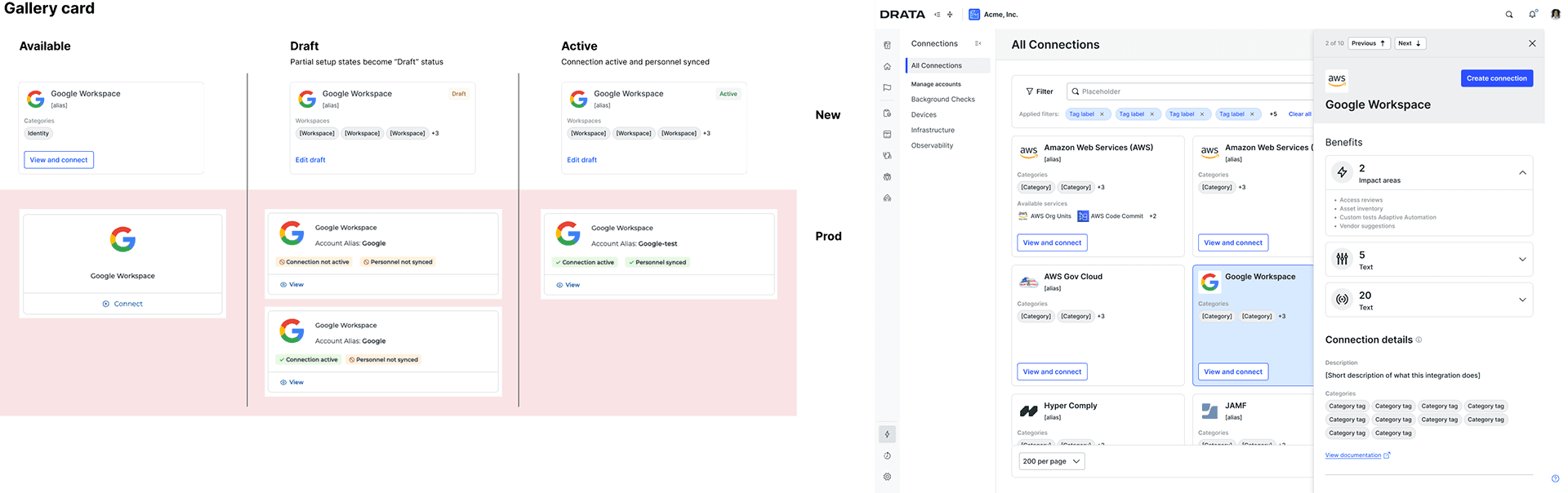
The gallery and side panel show what a connection does, what it unlocks, and which categories it covers before an admin starts setup. Nobody has to open a wizard to find out whether they need it.
Card states got simpler too. Production showed two status pills, connection and personnel sync, that read like errors on any half-finished setup. The new cards use three states: Available, Draft, and Active. A partial setup becomes a draft that the admin can pick back up, not a warning.
Setup: The IdP Flow Becomes the Template
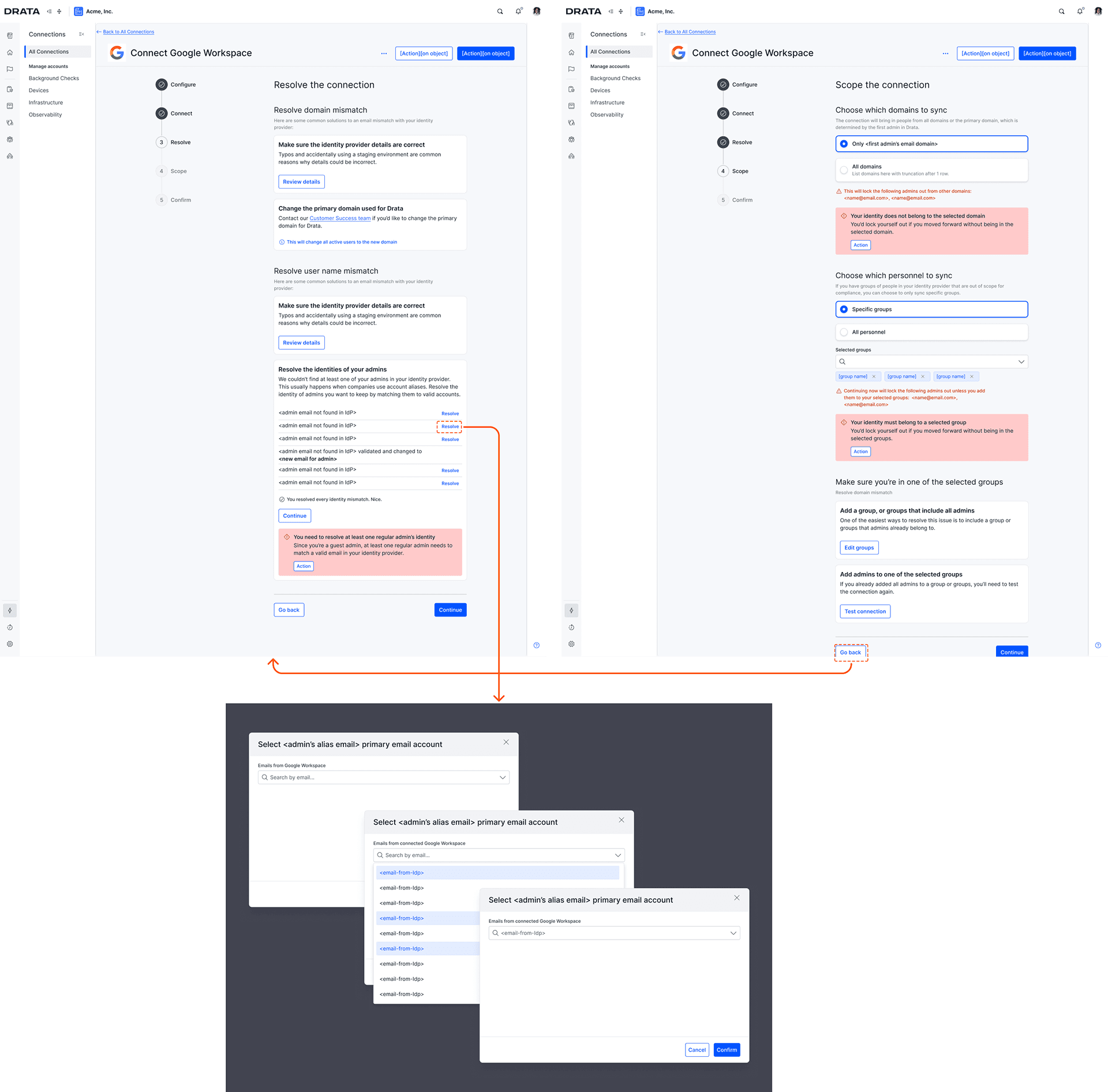
Every connection now runs through the same wizard: Configure, Connect, Resolve, Scope, and Confirm.
Configure puts prerequisites up front, so an admin learns they need Super Admin access on step one, not step three. That’s the same “get the right people in the room” problem from the original discovery, now handled before setup starts. Connect keeps provider instructions inside the flow, with copy buttons for client IDs and OAuth scopes.
Resolve and Scope are the original pre-check, turned into steps any connection can use. Resolve handles domain mismatches, username mismatches, and admin identities missing from the IdP, including the alias remapping from v1. Scope covers domain and group selection. The same floor applies to both. If a selection would lock out other admins, the warning names them. If it would lock out the person configuring it, the flow stops.
The rules behind those gates didn’t change. They’re the same ones mapped in the original flow, now running inside a surface built to hold them.

Post: A Home for the Connection
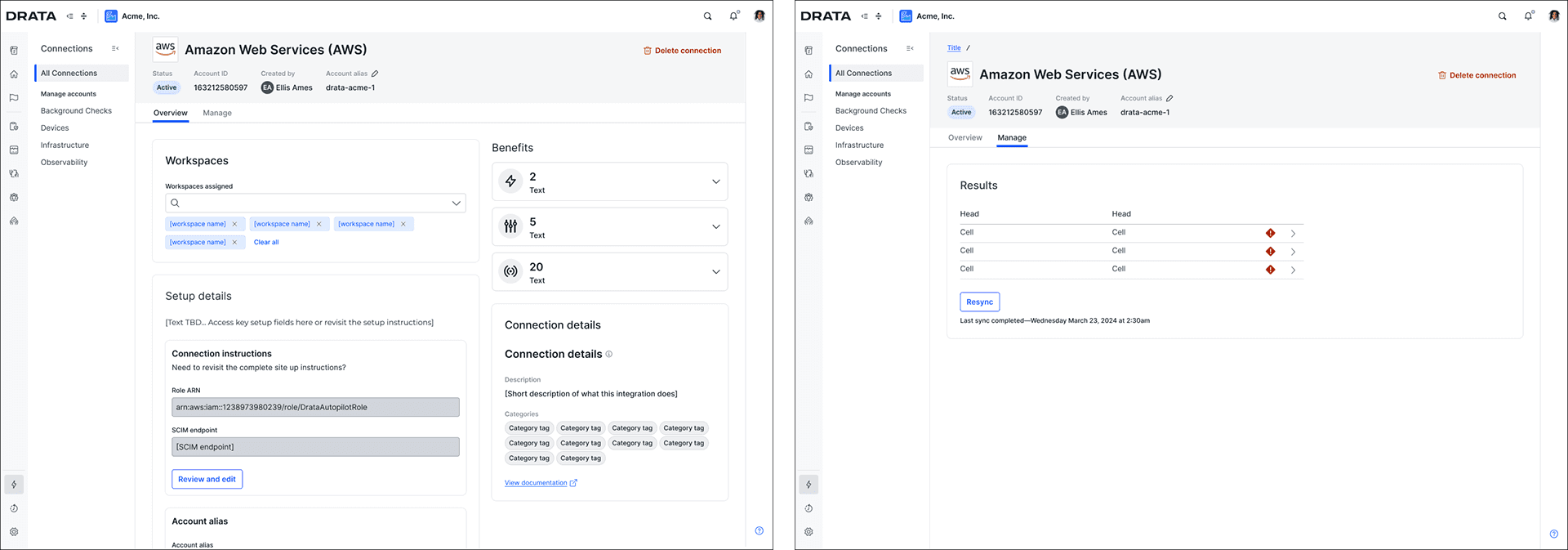
Once a connection is live, it gets a detail page instead of a closed drawer. Overview covers workspaces, benefits, setup details, and connection info. Manage shows sync results, flags issues, and offers a resync.
Setup details stay editable after launch, which lines up with one of the original principles: don’t silo setup content from the evergreen product. What an admin configured during setup is the same thing they manage afterward.
What’s Next
Domain selection is still binary: one domain or all. Granular subset selection remains the next step. Group selection already works that way, so the pattern is there when the added flexibility is worth the UI complexity.
The compounding failure mode—where fixing the multi-domain problem introduced a new version of the domain lockout—captures something true about this kind of work. Resolving interconnected failure conditions isn’t just about handling each case correctly. It’s about understanding how the resolutions interact, and sequencing them so that fixing one thing doesn’t quietly break another.


