
FIELD NOTES / PRODUCT DESIGN
Trust Center Onboarding—Speed to Impact
The full flow: three setup steps and a handoff to content.
Overview
When customers purchased a Trust Center, they also purchased themselves a project they hadn’t planned on. Publishing meant hunting down individual settings scattered across the product—no guidance, no sequence, no clear finish line. Just a lot of clicking around hoping you’d covered everything. Most customers took weeks to get their Trust Center live, and some never got there without help from their CSM.
The goal: nobody should need a support ticket to start using a product they just paid for.
Key Decisions
Reframed the work from fixing settings pages to designing a first-run experience.
Kept it additive and reversible: no navigation, backend, or data model changes.
Put the hardest step third and led it with a recommended default, accepting that some customers wouldn’t revisit it.
Roles & Responsibilities
Lead product designer on a growth team with a PM partner and a dedicated engineering pod. I owned research, UX strategy, interaction design, and illustration.
Discovery
First I had to pin down what “setup” meant. It turned out to be four loosely related groups of decisions:
Display details—basic company information the Trust Center shows publicly
Customization—logo, favicon, and brand styling
Document security—access and confidentiality settings for hosted documents.
Content—the documents, reports, and assets that give the Trust Center its value
All four already existed as separate settings pages. The tasks weren’t hard. They were untethered. A new customer had no way to know they needed all of them, in a particular order, before anything looked right or worked.
Reframing the Problem
The team’s first instinct was to fix the settings pages: reorganize the IA, clarify the navigation, add a checklist somewhere. These feel like design solutions because they are design solutions, but they were the wrong ones here, and I had to talk the team out of them.
Product management wanted to start with the settings pages because they were long and hard to scan. But the settings were already clean and organized, and all our evidence pointed to activation. I dug further into the data and showed them that solving activation first would also give us clearer signal on any real pain in the settings experience.
We also weighed adding more CSM support, but it didn’t scale, and the team was already stretched thin.
New customers shouldn’t have been on the settings pages at all before they understood what they were configuring. The product was starting them in the middle of a story they hadn’t been introduced to yet.
So I reframed the work as a first-run experience: a guided entry point that worked with the existing product.
I also pushed for a hard constraint: no changes to navigation. The wizard wouldn’t add sections, restructure the sidebar, or ask engineering to re-plumb settings. No backend changes and no new data models. It was additive only, and it disappeared once a customer finished setup. That kept the ship fast, the engineering risk low, and the whole thing reversible. If the wizard was the wrong call, we could pull it without undoing anything.

Design Strategy
Sequencing was the first design decision, before any UI. Wizards tend to front-load the hard stuff while they have the user’s attention. I went the other way and started with easy wins.
Content became the handoff at the end, so the wizard came out to three active steps and a completion screen.
The Wizard
Steps 1 and 2: Easy wins
Display details—company name, URL, and basic info. Almost nothing to decide. The purpose of this step isn’t information collection—it’s orientation. Customers learn what kind of thing they’re setting up before they’re asked to make any real choices.
Customization—logo upload (URL or file), favicon, and visual identity. More engaging, still low friction. This is where the Trust Center starts to feel like theirs, before anything is published.
Two quick wins gave customers momentum going into step 3.
Step 3: Document security
The hardest step, placed third on purpose. By now customers had two steps behind them and a clearer picture of what they were configuring.
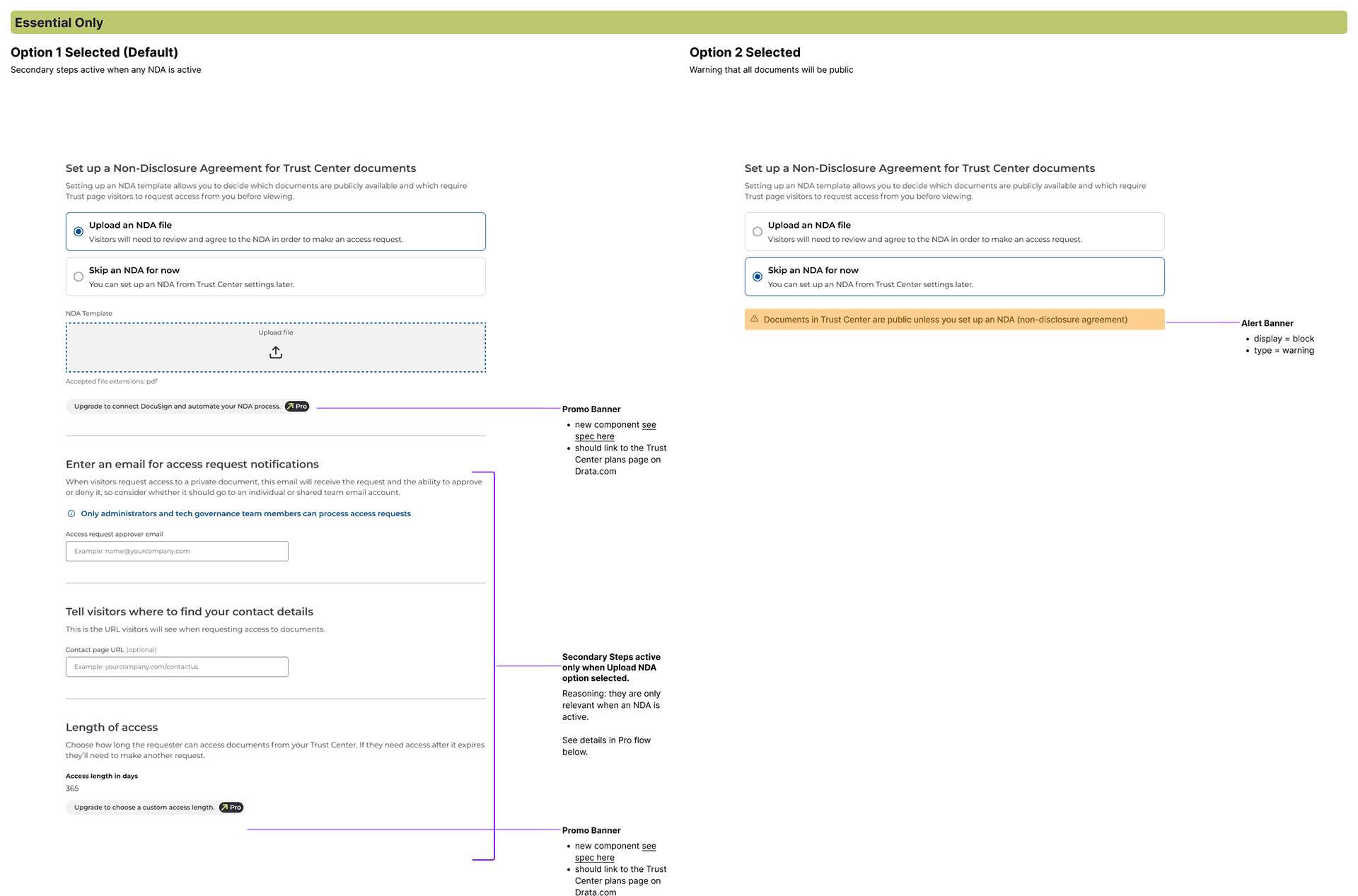
Early versions showed every option at once, and customers stalled. Seeing everything at once made a manageable task look insurmountable. The fix was to lead with a clearly labeled default and reveal the follow-up fields (approval email, contact page, and access length) only when a customer chose to require an NDA. The default had to read as our real recommendation.
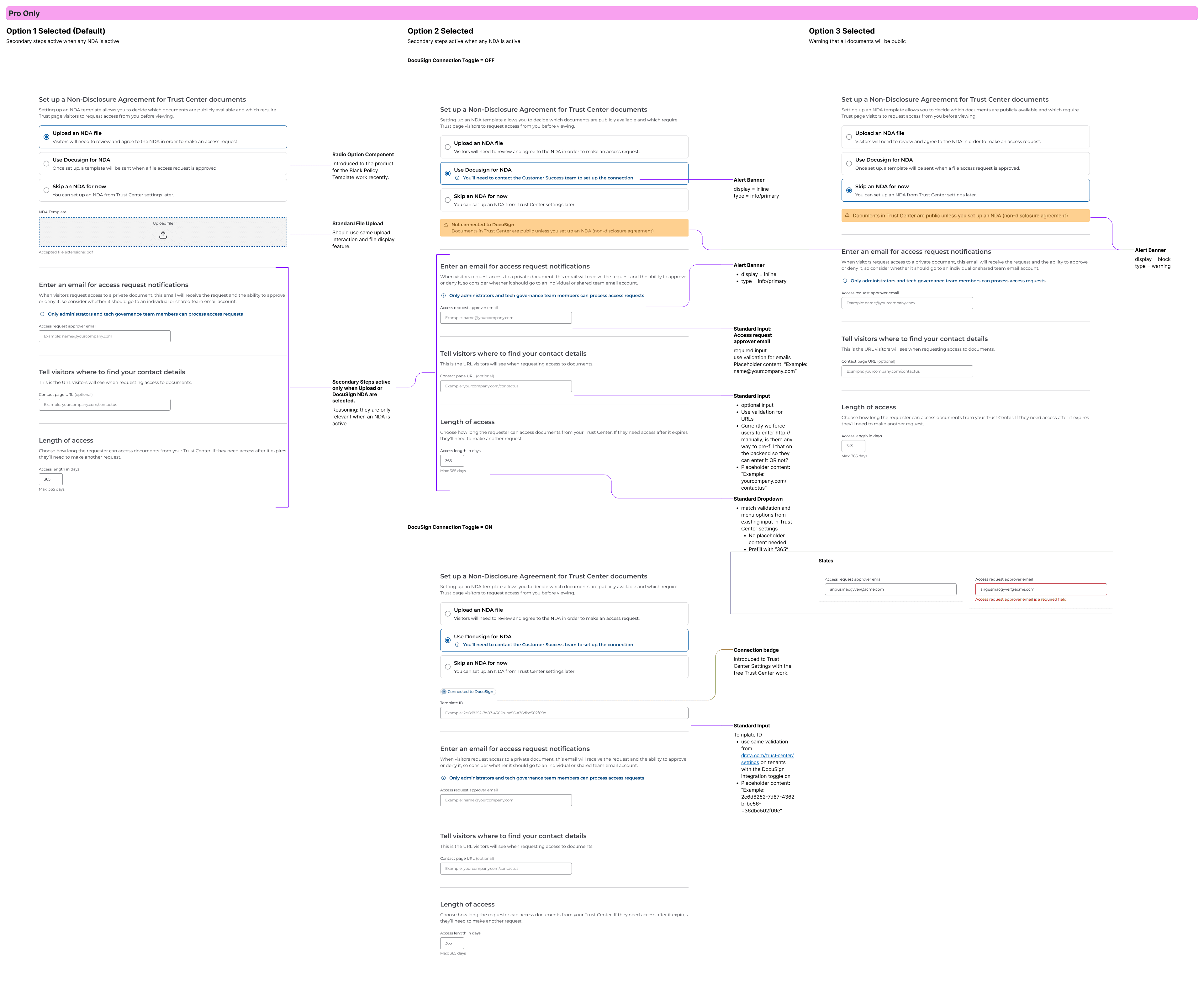
The step also adapted to the customer’s plan. Essential customers could upload an NDA or skip it. Pro customers could also connect DocuSign, and Essential customers saw a light prompt to upgrade.
The tradeoff: with a recommended default, some customers will set it and never revisit it, including some who’d be better served by a different setting. I accepted that. A wizard customers abandon at step 3 helps no one, and getting them through first-time setup was the priority.
Essential plan: upload an NDA or skip it. Follow-up fields appear only when an NDA is required.
Pro plan adds DocuSign as a third option.
Handoff
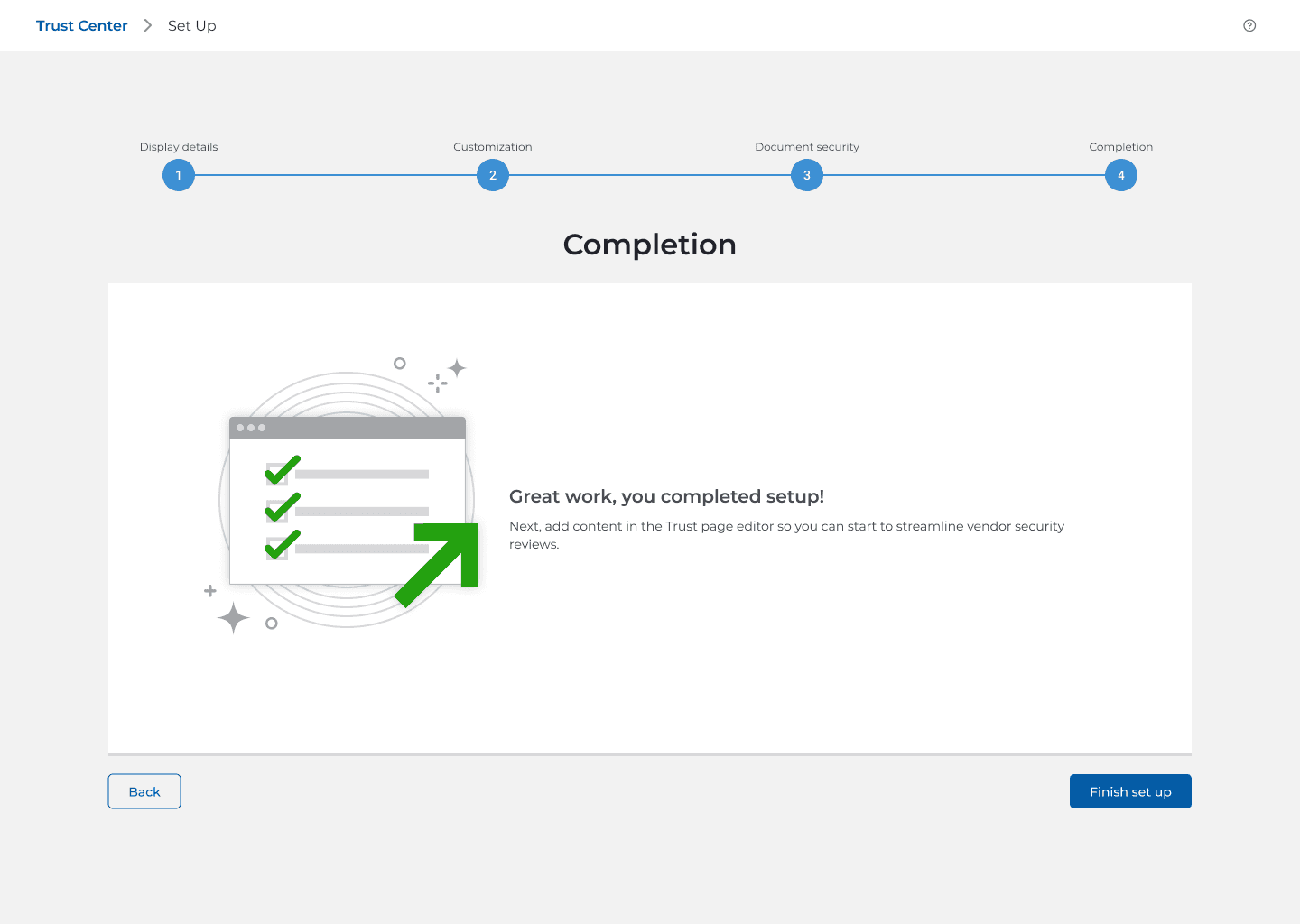
The last screen points straight to the next job: adding content in the Trust page editor.
Completion hands off to the Trust page editor
Results
Before: Customers took weeks to publish their Trust Center, and some needed CSM support to get there.
After: Most customers finish setup in their first session. Time to publish, measured from purchase to first publish, dropped 40%.
The clearest proof came at Drataverse June 2023 when we announced Trust Center Essential and offered onboarding at the Drata booth. Every customer who logged in finished setup and published that day.
The quick-wins wizard became a documented pattern for the product team, especially for complex or technical configuration.
Time to value is a retention signal. The sooner a customer’s Trust Center is live, the sooner they see it working for them. That made the wizard a business case too: onboarding deserves the same investment as acquisition.
Setup used to take tribal knowledge or a hand from a CSM or support. Now customers handle it on day one without instructions.
What I Would Do Next
I’d want to know how many customers kept the recommended security default and whether any changed it later. If few ever revisit it, a nudge after their first access request would close that gap without adding friction to setup.


